FramedeoFramedeo

Startup launch video maker

Launch your startup with a video built in minutes.

Turn the website, pitch, logo, and product screens you already have into a polished startup launch video. Generate the full first cut, then change anything before export.

Demo

Founder speed with a designed result.

A startup launch story made from the product—not a library of generic startup clips.

Why Framedeo

One launch asset, ready for every important link.

Founders need to explain the product on a homepage, launch platform, social post, and investor or customer message. Framedeo creates one editable source you can adapt.

Go from positioning to story

Use the website and brief to turn a compact pitch into a visual hook, product reveal, proof, and launch CTA.
Look polished without a production cycle

Generate motion, voice-over, music, and scene timing in minutes, then review the actual video instead of managing weeks of drafts.

Keep the launch reusable

Duplicate the project for Product Hunt, LinkedIn, X/Twitter, a pitch, a homepage hero, or the next product milestone.

Examples

Videos made with Framedeo.

Different products, different goals. Each one started with a website link and a few screenshots. Hover or click a video to play it, with sound.

  • 0:24
    ScaloomProduct video
  • 0:20
    RelviosProduct video
  • 0:20
    HorazyProduct video

Templates

15 ways to tell a launch.

Each template is a finished film: its beats, its cuts and its motion. Pick one when you create a project and your product fills it — your words, your logo, your screenshots. Every preview here is the template itself, playing.

  • Orbit storyEditorial pictures orbit the story, app screens fan out, search lights up and desktop screens assemble in depth.

    Mobile revealMacro cameraEditorial spotlight

  • Shader headlineThe title burns out of the moving field word by word, then quiet looks, the product and one metallic gleam. For a launch that wants to look expensive.

    Shader titleQuiet looksOne gleam

  • Marker briefOne phrase backed by a marker stroke, and the drafts fossilised behind the final word. For a product whose story is the writing.

    Marker phraseFossil draftsConverge outro

  • Guided flowA prompt opens the story, the desktop gets a guided tour, the mobile app scrolls into view and a portfolio flows past.

    Prompt to productGuided tourPortfolio flow

  • One to manyOne idea fans into many surfaces, then converges back into the mark. For a product that turns one input into many outputs.

    Fan hookConverge outroVoronoi plate

  • DecodeThe line the viewer types resolves out of noise, the numbers climb, and everything the product touches orbits its mark — the name lands after the evidence. For a technical product with something to prove.

    Decoded lineClimbing chartIntegration hub

  • Pocket launchAn edge-on app reveal, a typed brief, a desktop close-up and an editorial carousel. For a mobile-first launch.

    Orbiting picturesMobile fanDepth stack

  • Before and afterThe marks you uploaded land in a row, one figure turns over into another, and the product sits full frame on a studio plane. For a product that saves time you can measure.

    Marks landingTurning figureStudio plane

  • Macro installOne slow pan across the whole surface, a kinetic title, then the line you type under a macro lens. For a developer tool.

    Surface panKinetic titleMacro terminal

  • Grain flightA slammed claim, a dive into the brand, then capabilities station by station. For a confident launch or a relaunch.

    Slam hookFeature stationsGrain plate

  • Shader galleryShort quiet claims over full-frame shader beats, then the three steps and the link. For a visual product that shows better than it explains.

    Quiet beatsShader cutsFast

  • Signal diveThe camera dives into the motif, the mark lands, then verbs and stations carry the tour. For a tool with one strong, recognisable action.

    Dive hookVerb beatsTight cuts

  • Design systemCalm typography, a real interface beat and a card that explains the promise. For a product whose craft is the argument.

    Calm typeReal UIExplainer card

  • Open sourceA pain line, the promise, then the capabilities read as plain lines. For a developer product or a launch that leads with candour.

    Pain hookPlain linesConverge outro

  • Prompt to filmThe brief is typed on screen, and everything after it is the answer. For a product you talk to before you use it.

    Typed briefCalm cutsReal UI

Prefer no template? The AI plans the beats from your product instead.

Without and with Framedeo

What one product video really costs.

The usual way means a budget, a designer and a calendar. Here is the same video, done the other way.

One product videoWithout FramedeoWith Framedeo
Price for one video$2,000 to $8,000 to hire a motion designerFrom $29 per month, videos included in your plan
First version ready in6 to 10 weeks of briefs, drafts and feedbackA few minutes, right after you add your product
If you make it yourself6 to 12 months to learn After Effects, plus $23 to $60 per month for the softwareNo editing experience, nothing to install
Voice over and musicA voice actor to book and a music licence to buyBoth included, or upload your own
Changing one lineAnother round of revisions and another invoiceOpen the editor and change it yourself
Making a second videoStart from zero and pay the full price againCopy the project and swap the content

Prices and timelines above are typical market rates for one 60 second product video.

How it works

Five steps from a link to a video file.

You already know every step. Framedeo simply does them in order.
  1. 1Add your productPaste your website link, upload your logo and a few screenshots, and say what the video is for.
  2. 2Get your script and choose a voiceFramedeo reads your product and writes the words. Keep the script or rewrite any line, then pick a voice from the library or upload your own.
  3. 3Add musicChoose a track from the library or bring your own. It sits under the voice so the words stay clear.
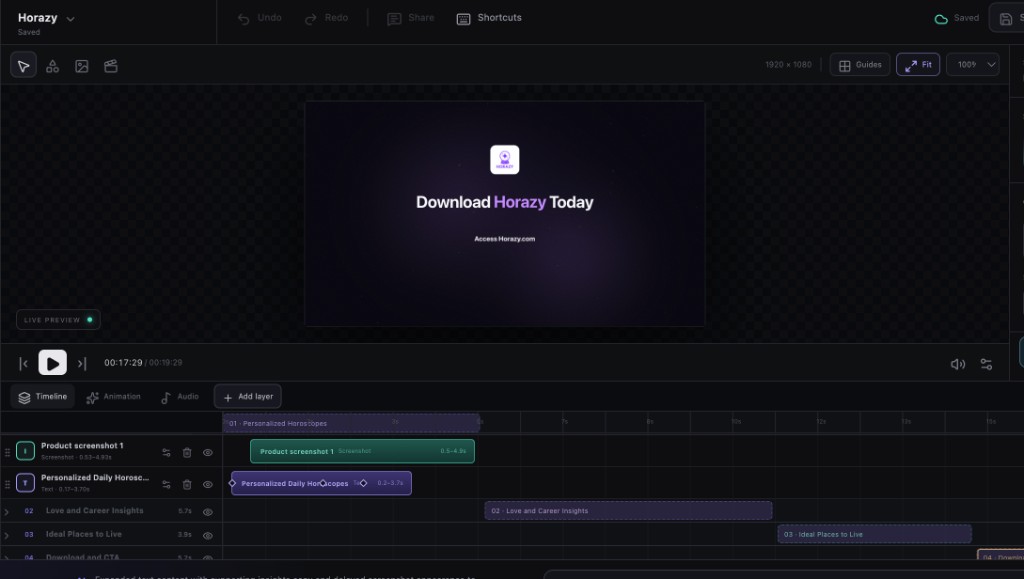
  4. 4Change anythingOpen the editor. Move scenes, rewrite text, swap a screenshot, fix the timing.
    The Framedeo editor, with a live preview, timeline and layers.
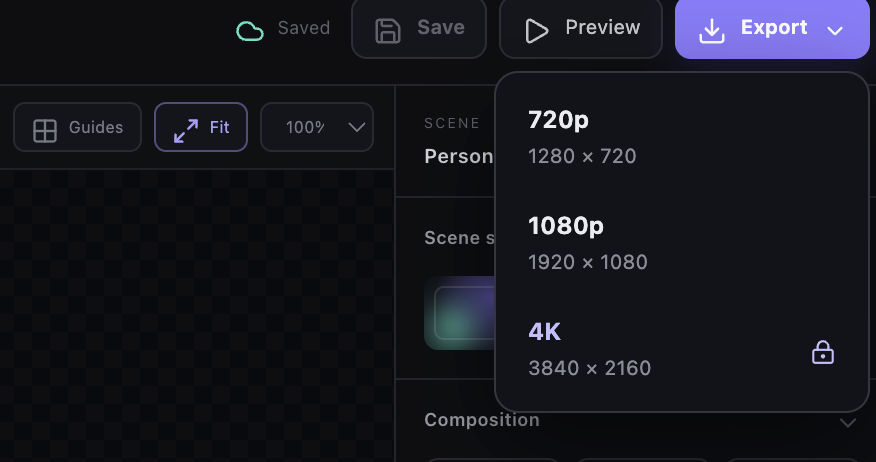
  5. 5DownloadExport an MP4 file, ready to post on your website or anywhere else.
    The export menu, with 720p, 1080p and 4K.

MCP for AI agents

Your coding agent can direct the whole film.

Connect Framedeo to Claude, Gemini, OpenCode or ZeroClaw. One request can inspect a product page, use your real media, choose the voice and music, generate and edit the scenes, then return the finished download.

One prompt, finished film
$ Turn https://acme.com into a 30-second launch film.
Use the attached logo and dashboard screenshot, choose a clean
technical template, write a calm voice-over, add minimal music,
generate the motion, tighten scene three, then export H.264 at
1080p and give me the download link.
  • Claude Codeclaude mcp add --transport http --header "Authorization: Bearer $FRAMEDEO_API_TOKEN" framedeo https://framedeo.com/mcp
  • Gemini CLIgemini mcp add --transport http --header "Authorization: Bearer $FRAMEDEO_API_TOKEN" framedeo https://framedeo.com/mcp
  • OpenCodeopencode mcp add framedeo -- node /path/to/framedeo/apps/mcp/dist/stdio.js
  • ZeroClawzeroclaw config set mcp.servers.framedeo.url https://framedeo.com/mcp
Read the MCP setup and tool docs Short setup examples · full auth, timeout and agent-access details in the docs

Features

Everything a product video needs, in one place.

Three parts: what goes in the video, what it sounds like, and what you get out.

1. What goes in the video

  • Your own contentYour website, your logo and your screenshots become the real scenes. No stock footage and no generic template.
  • A script written for youFramedeo turns what you sell into narration. You read it and approve it before a single word is spoken.

2. What it sounds like

  • Voice overGenerate a voice from the library, or upload your own recording. Each scene is cut to the sentence being spoken.
  • Background musicAdd a track from the library or your own file. Levels are mixed so the voice always stays in front.

3. What you get out

  • A real editorEvery scene, image and word stays editable. Change it by hand, or ask the AI editor to do a pass for you.
  • An MP4 fileDownload the finished video in 1080p or 4K, depending on the plan you choose.

Pricing

Start free. Pay when you download.

Create an account and build your first video for free. Choose a plan when you want the MP4 file and more than one project a month.

Starter

$29/month

Start shipping product videos with AI direction and editable scenes.

  • 2 projects a month
  • 1080p MP4 export
  • Website-to-video generation
  • Voice-over and music
  • Email support
  • 4K export
  • Team seats
  • Priority render queue
Choose Starter

Agency

$199/month

4K delivery, more seats, and the queue reserved for client work.

  • 25 projects a month
  • 4K MP4 export
  • Unlimited team seats
  • Priority render queue
  • Dedicated success manager
Choose Agency

Questions

Startup launch video questions

Can I make a Product Hunt launch video?

Yes. Describe the Product Hunt audience and keep the opening immediate, the product proof visible, and the story understandable with or without sound.

Do I need a finished brand system?

No. A website, product name, a few screens, and clear direction are enough to begin. Add a logo and brand assets when they are available.

Can I update the video as the startup changes?

Yes. The editable project makes it possible to revise positioning, product screens, features, narration, or the final CTA.

Your startup already has the raw material.

Add the website, pitch, and screens. Framedeo will shape them into a launch film.

Start free